Connectivity
IoT hardware
B2B
A geocaching game designed in 2 days — Making invisible technology something you could feel.
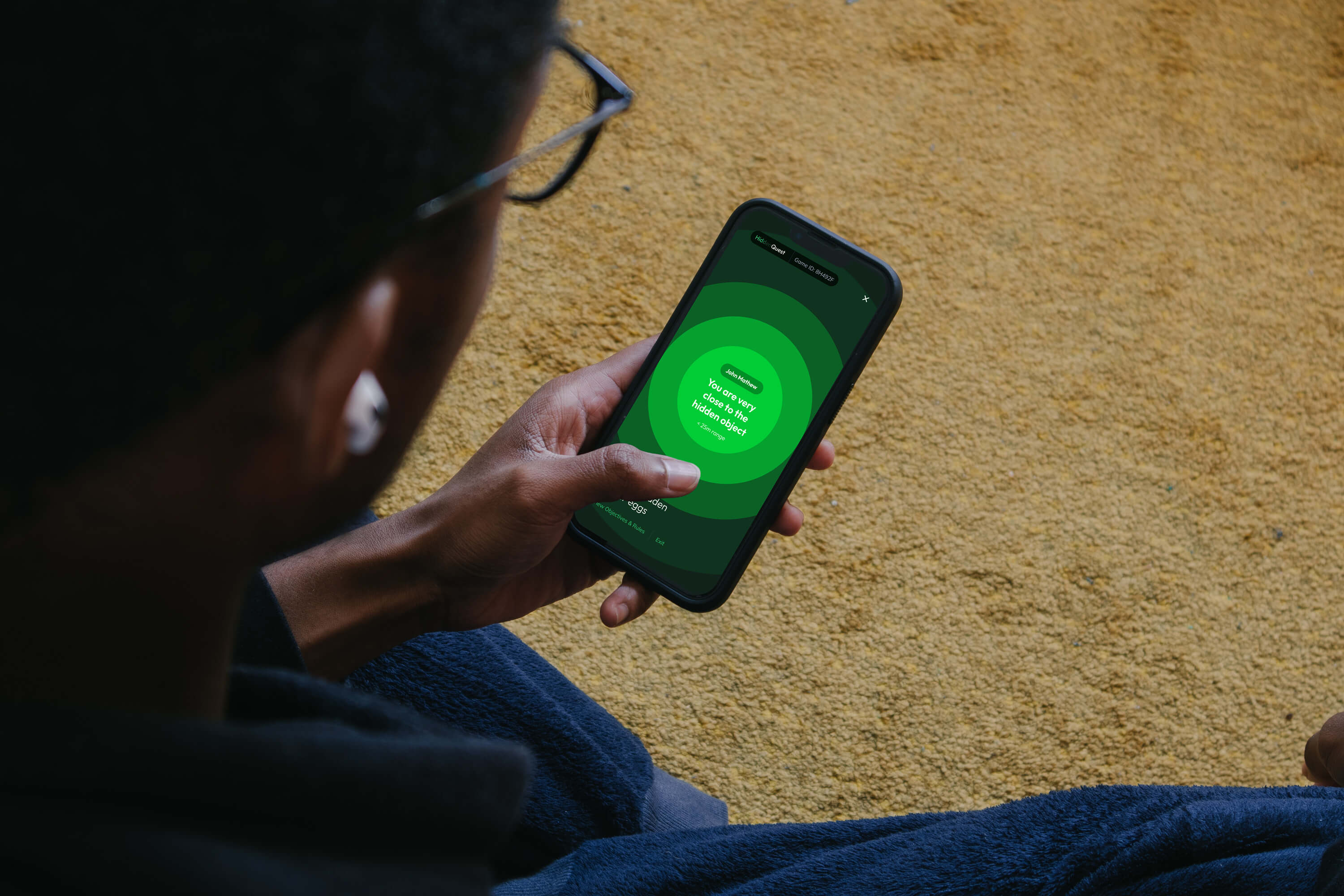
The client was a LoRa gateway provider and chip manufacturer. Their problem wasn't the technology — it was explaining it to non-technical buyers. I designed a live game that turned signal strength into a physical experience: find the hidden egg before everyone else does.
Role
Concept, UX, Visual design,
Led Design + Development
Timeline
2 days concept to design
Client
LoRa hardware manufacturer
Scope
3 applications
— Viewer · Play · Admin
01 - The brief
LoRa is a low-power wireless technology used in IoT networks. Powerful — but invisible. The client needed to demonstrate its range and signal precision to a room of technical staff, IT enthusiasts, and senior executives at a live event. The brief: design an experience that makes signal strength tangible. We proposed a geocaching game where players hunt hidden objects guided only by LoRa signal — the closer you get, the stronger the signal, the clearer the feedback on your phone.
02 - The design challenge
Three audiences. One event. Three products required.
Players in the field needed a mobile app that worked without maps or GPS — only LoRa signal strength as a guide. Spectators watching from the sidelines needed a real-time viewer on a large screen showing every player's position and proximity to each egg. Game administrators needed a tool to set up, publish, and manage the game before and during the event.
All three had to work together, in real time, at a live venue with 58 participants.
03 - Three products, one system
We designed three interconnected applications — each serving a different role in the same live event.
Hidden
Quest
VIEWER
— for spectators on large screens
A real-time event dashboard showing 58 participants across the game area, their proximity to each hidden egg, active vs offline status, and live discovery updates. Designed responsive for large-screen projection — a different constraint to every other screen in the project.


HiddenQuest Viewer Application
Hidden
Quest
PLAY
— for players in the field
The in-game mobile experience. No maps. No GPS coordinates. Just a signal. I designed the onboarding flow (game join → objectives → how to play), and then the core proximity UI — a full-screen visual that communicates only one thing: how close you are.

HiddenQuest Play Application Flow
The proximity screen is the product.

Player - hidden object range variations
Four states. No numbers. No coordinates. The expanding colour circle is the only feedback the player gets — and it's enough.
Hidden
Quest
ADMIN
— for game organisers
A web-based game management tool built for the event organisers. Place objects on a map, set point values, invite participants, add hints, schedule the game, publish. The entire event setup happens here before a single player enters the field.


HiddenQuest Admin Application
04 - The design decision worth remembering
The obvious solution for a proximity-based game is a number. "You are 47 metres away." We didn't use a number.
Numbers require interpretation. A circle that fills the screen doesn't. Blue means far. Amber means getting closer. Green means you're almost there. The transition between states is the feedback — players described it as feeling like the game was "breathing." That response came from removing information, not adding it.
05 - Outcomes
The game ran live at the event with 58 participants. The client used it as their primary demonstration tool for the LoRa gateway product to executive and technical audiences. Three applications — conceived, designed, and built in a tight timeline.
The brief was to make LoRa technology understandable. The measure of success: executives who walked in not knowing what LoRa was, walked out having used it to find a hidden egg. That's the clearest brief I've ever been given — and the clearest outcome.
NEXT PROJECT
Geofenz — Geographical editor tool
View
Connectivity
IoT hardware
B2B
A geocaching game designed in 2 days — Making invisible technology something you could feel.
The client was a LoRa gateway provider and chip manufacturer. Their problem wasn't the technology — it was explaining it to non-technical buyers. I designed a live game that turned signal strength into a physical experience: find the hidden egg before everyone else does.
Role
Concept, UX, Visual design,
Led Design + Development
Timeline
2 days concept
to design
Client
LoRa hardware manufacturer
Scope
3 applications
— Viewer · Play · Admin
01 - The brief
LoRa is a low-power wireless technology used in IoT networks. Powerful — but invisible. The client needed to demonstrate its range and signal precision to a room of technical staff, IT enthusiasts, and senior executives at a live event. The brief: design an experience that makes signal strength tangible. We proposed a geocaching game where players hunt hidden objects guided only by LoRa signal — the closer you get, the stronger the signal, the clearer the feedback on your phone.
02 - The design challenge
Three audiences. One event. Three products required.
Players in the field needed a mobile app that worked without maps or GPS — only LoRa signal strength as a guide. Spectators watching from the sidelines needed a real-time viewer on a large screen showing every player's position and proximity to each egg. Game administrators needed a tool to set up, publish, and manage the game before and during the event.
All three had to work together, in real time, at a live venue with 58 participants.
03 - Three products, one system
We designed three interconnected applications — each serving a different role in the same live event.
Hidden
Quest
VIEWER
— for spectators on large screens
A real-time event dashboard showing 58 participants across the game area, their proximity to each hidden egg, active vs offline status, and live discovery updates. Designed responsive for large-screen projection — a different constraint to every other screen in the project.
HiddenQuest Viewer Application
Hidden
Quest
PLAY
— for players in the field
The in-game mobile experience. No maps. No GPS coordinates. Just a signal. I designed the onboarding flow (game join → objectives → how to play), and then the core proximity UI — a full-screen visual that communicates only one thing: how close you are.
HiddenQuest Play Application Flow
The proximity screen is the product.
Player - hidden object range variations
Four states. No numbers. No coordinates. The expanding colour circle is the only feedback the player gets — and it's enough.
Hidden
Quest
ADMIN
— for game organisers
A web-based game management tool built for the event organisers. Place objects on a map, set point values, invite participants, add hints, schedule the game, publish. The entire event setup happens here before a single player enters the field.
HiddenQuest Admin Application
04 - The design decision worth remembering
The obvious solution for a proximity-based game is a number. "You are 47 metres away." We didn't use a number.
Numbers require interpretation. A circle that fills the screen doesn't. Blue means far. Amber means getting closer. Green means you're almost there. The transition between states is the feedback — players described it as feeling like the game was "breathing." That response came from removing information, not adding it.
05 - Outcomes
The game ran live at the event with 58 participants. The client used it as their primary demonstration tool for the LoRa gateway product to executive and technical audiences. Three applications — conceived, designed, and built in a tight timeline.
The brief was to make LoRa technology understandable. The measure of success: executives who walked in not knowing what LoRa was, walked out having used it to find a hidden egg. That's the clearest brief I've ever been given — and the clearest outcome.
NEXT PROJECT
Geofenz — Geographical editor tool
View
Connectivity
IoT hardware
B2B
A geocaching game designed in 2 days — Making invisible technology something you could feel.
The client was a LoRa gateway provider and chip manufacturer. Their problem wasn't the technology — it was explaining it to non-technical buyers. I designed a live game that turned signal strength into a physical experience: find the hidden egg before everyone else does.
Role
Concept, UX, Visual design, Led Design + Development
Timeline
2 days concept
to design
Client
LoRa hardware manufacturer
Scope
3 applications
— Viewer · Play · Admin
01 - The brief
LoRa is a low-power wireless technology used in IoT networks. Powerful — but invisible. The client needed to demonstrate its range and signal precision to a room of technical staff, IT enthusiasts, and senior executives at a live event. The brief: design an experience that makes signal strength tangible. We proposed a geocaching game where players hunt hidden objects guided only by LoRa signal — the closer you get, the stronger the signal, the clearer the feedback on your phone.
02 - The design challenge
Three audiences. One event. Three products required.
Players in the field needed a mobile app that worked without maps or GPS — only LoRa signal strength as a guide. Spectators watching from the sidelines needed a real-time viewer on a large screen showing every player's position and proximity to each egg. Game administrators needed a tool to set up, publish, and manage the game before and during the event.
All three had to work together, in real time, at a live venue with 58 participants.
03 - Three products, one system
We designed three interconnected applications — each serving a different role in the same live event.
Hidden
Quest
VIEWER
— for spectators on large screens
A real-time event dashboard showing 58 participants across the game area, their proximity to each hidden egg, active vs offline status, and live discovery updates. Designed responsive for large-screen projection — a different constraint to every other screen in the project.
HiddenQuest Viewer Application
Hidden
Quest
PLAY
— for players in the field
The in-game mobile experience. No maps. No GPS coordinates. Just a signal. I designed the onboarding flow (game join → objectives → how to play), and then the core proximity UI — a full-screen visual that communicates only one thing: how close you are.
HiddenQuest Play Application Flow
The proximity screen is the product.
Player - hidden object range variations
Four states. No numbers. No coordinates. The expanding colour circle is the only feedback the player gets — and it's enough.
Hidden
Quest
ADMIN
— for game organisers
A web-based game management tool built for the event organisers. Place objects on a map, set point values, invite participants, add hints, schedule the game, publish. The entire event setup happens here before a single player enters the field.
HiddenQuest Admin Application
04 - The design decision worth remembering
The obvious solution for a proximity-based game is a number. "You are 47 metres away." We didn't use a number.
Numbers require interpretation. A circle that fills the screen doesn't. Blue means far. Amber means getting closer. Green means you're almost there. The transition between states is the feedback — players described it as feeling like the game was "breathing." That response came from removing information, not adding it.
05 - Outcomes
The game ran live at the event with 58 participants. The client used it as their primary demonstration tool for the LoRa gateway product to executive and technical audiences. Three applications — conceived, designed, and built in a tight timeline.
The brief was to make LoRa technology understandable. The measure of success: executives who walked in not knowing what LoRa was, walked out having used it to find a hidden egg. That's the clearest brief I've ever been given — and the clearest outcome.
NEXT PROJECT
Geofenz — Geographical editor tool
View